How to Build a Home Office Ergonomic Program That Improves Productivity, Reduces Claims and Retains Top Talent
FOR EHS, HR, AND C-SUITE LEADERS
A practical framework for the EHS, HR, and C-suite leaders building corporate home office ergonomic programs that deliver measurable business outcomes.
The patterns and recommendations below are amassed from direct experiences of Pacific Ergonomics across more than 100 corporate clients with companies of all types and sizes, including healthcare, biotech, defense, government, technology, non-profits, higher education, and Fortune 500 employers.
A corporate home office ergonomic program delivers measurable returns across four business dimensions: productivity, workers’ compensation claims, insurance exposure, and talent retention. For companies with remote, hybrid, or distributed workforces, building this program correctly is one of the highest-return operational investments available, often costing less than the stipend programs it replaces.
This guide is for the EHS, HR, and C-suite leaders who are designing or upgrading a real home office ergonomic program and want to know what such a program needs to include to actually achieve those outcomes. The framework below is grounded in two decades of corporate ergonomic consulting, thousands of virtual ergonomic assessments, and direct experience with the operational components that distinguish programs that deliver from programs that only document activity.
Key Takeaways
- The strongest corporate home office ergonomic programs are built around operational systems and processes, not just ergonomic expertise.
- Real ergonomic assessments conducted by certified ergonomists produce measurable outcomes that self-assessment surveys cannot match.
- Hybrid employees represent the highest-leverage population to support, since both their home and corporate workstations contribute to cumulative ergonomic exposure.
- Properly run programs typically cost less than stipend approaches once wrong-equipment cycles, productivity loss, and claims are accounted for.
- Visibility, professional installation, personalized training, and scheduled reassessment are the four operational components that turn ergonomic spend into business results.
What You Will Find in This Article
- Build the Program Around Systems and Processes, Not Just Ergonomics
- Build Visibility Into the Home Office Population You Are Supporting
- Build Visibility Into Every Stage of the Ergonomic Assessment Process
- Build Professional Installation Into the Home Office Ergonomic Program
- Build the Program Around Real Ergonomic Assessments, Not Self-Assessment Surveys
- Design Equipment Request Channels That Deliver the Right Solution
- Build a Defined Process: The Process Is the Program
- Design the Program to Adapt as Employees Change
- Specify Equipment by Fit, Not by Category Name
- Deliver Personalized Ergonomic Training, Not Generic Training
- Equip EHS Teams and Trained Managers With the Right Lens
- Build Reassessment Into the Operating Cadence
- Design the Program to Support Hybrid Employees Specifically
- Use the Program as a Recruiting and Retention Asset
- Control Cost by Specifying the Right Equipment the First Time
- How to Start in the Next 30 Days
- Frequently Asked Questions
The Business Case Every Home Office Ergonomic Program Should Make
A company cannot afford not to build this program. The conversation is about which of four arguments lands hardest with leadership.
Sit across from a CFO or CEO and the question often comes back to this: is a home office ergonomic program actually worth what it costs? The honest answer is that a company cannot afford not to do it. That answer is too short to be persuasive on its own. The real conversation works through four separate arguments. The executive only has to find one of them compelling for the program to make sense.
The productivity argument. Set ergonomic risk aside for a moment. Set workers’ compensation entirely aside. Even if employees could work from a hammock every day without injury, an absurd hypothetical used to make the point, the productivity argument still holds. If a contractor were tasked with building a house and given only a hammer, no saw, no level, no measuring tools, the contractor would build a worse house, slower, with more rework. Office work is no different. An employee performing eight hours of cognitive and computer-based work needs the right tools, properly fitted to their body and their workstation.
The insurance argument. In industries where workers’ compensation experience modification rates determine insurance premiums, and in some industries, contract eligibility, a poor claims history can render a company ineligible for the work it depends on. In severe cases, claims history forces companies into state-fund insurance programs at rates so high they have ended otherwise viable businesses.
The claims argument. A workers’ compensation claim related to a musculoskeletal disorder typically costs a company between $50,000 and $100,000 once medical, indemnity, and lost-time costs are summed. A single claim avoided pays for the program many times over.
The talent argument. The labor market has decided that home office support is a benefit, not an indulgence. Top candidates evaluating offers compare how seriously prospective employers treat remote and hybrid work. Existing employees making the decision to stay or leave are doing the same comparison. Companies that treat the home office as part of the workspace attract better candidates and retain them longer. Companies that treat it as outside the workspace lose both groups to competitors who do not.
The investment in a real program is bounded and predictable. The cost of not running one is unbounded and accumulates across productivity, insurance, claims, and human capital simultaneously.
The conversation with the CEO or CFO collapses into a single question: which of these do you care about If the answer is any of them, the program is worth it. The 15 elements that follow are how a real program delivers on those four arguments.
1. Build the Program Around Systems and Processes, Not Just Ergonomics
Most companies do not have a home office ergonomic problem. They have a systems and processes problem dressed up as an ergonomic problem.
The distinction matters because it points to a different solution. A company that thinks the problem is ergonomic expertise will hire an ergonomist or contract ergonomic consulting expert. The expertise will exist, though their overarching problems will not be solved.
The same employees who needed help six months ago will still be waiting.
We have seen this pattern across companies of every size before we have set up a proper program. An employee submits a request or completes an assessment. The recommendation is produced. The recommendation enters a procurement queue. Often it goes to more than 6-8 people for a single person. Approvals, emails, paperwork back and forth. Meanwhile, weeks pass. Sometimes months pass.
Some clients it is over a year or more.
……………………………The procurement team requires additional approvals.
More weeks pass.
Finally, the order is placed.
Delivery is scheduled. Then the employee is not home for the delivery window. The equipment is rerouted. Installation is not coordinated with the assessment recommendations. The employee receives the equipment but no installation date.
EHS has no visibility where the bottleneck is. Some clients we have worked with had assessments sitting in queue for over a year before any equipment moved.
This is not an ergonomic failure. It is an operational failure. The ergonomist did the work. The recommendation was correct. The system did not have a way to act on it.
Most ergonomic teams are excellent at the work they were trained for. They identify risk accurately. They specify solutions appropriately. However, ergonomist generally speaking were not trained in the design of multi-stage operational processes that route work across procurement, IT, facilities, HR, and external vendors. That is a different discipline that only a select few companies can offer.
A real home office ergonomic program treats the operational infrastructure as a first-class concern, equal in importance to the ergonomic expertise itself. The system has to handle the full lifecycle, not just the assessment. That lifecycle includes:
- Onboarding new hires, with assessment and equipment delivered before discomfort develops
- Routing discomfort reports to assessment within a defined service window
- Coordinating equipment selection with the curated catalog so procurement is fast and predictable
- Verifying that installation has been completed correctly and that the employee was trained on adjustment
- Following up after installation to confirm the equipment is being used and the discomfort has resolved
- Reassessing on a defined cadence, and triggering reassessment when employees move, change roles, or report new symptoms
- Providing ongoing training that adapts as the employee’s situation changes
THE PRINCIPLE
The companies that get measurable outcomes from home office ergonomic programs are the ones that built the operating system around the expertise, not the ones that hired the most credentialed ergonomist.
2. Build Visibility Into the Home Office Population You Are Supporting
A program that does not account for the actual real differences of employees’ homes is not a program. It is a guess.
A home office ergonomic program that does not account for the actual home, the space, the person, the constraints, the family, the room, is not a program. It is a guess. And a program that provides no equipment at all, leaving employees to figure it out on their own, is not a program either. It is an abdication.
Many companies make the mistake and design ergonomic programs around an idealized assumption: that every employee has a dedicated room with a door, a defined workspace, a desk, a proper ergonomic chair, and the same physical conditions a corporate office would provide.
Or they make no provision at all, treating the home office as the employee’s private problem. In both cases, the employees those programs are meant to protect are working in actual homes, with actual constraints, that the program never measured and never accounted for.
To understand how absurd this is, picture the corporate equivalent.
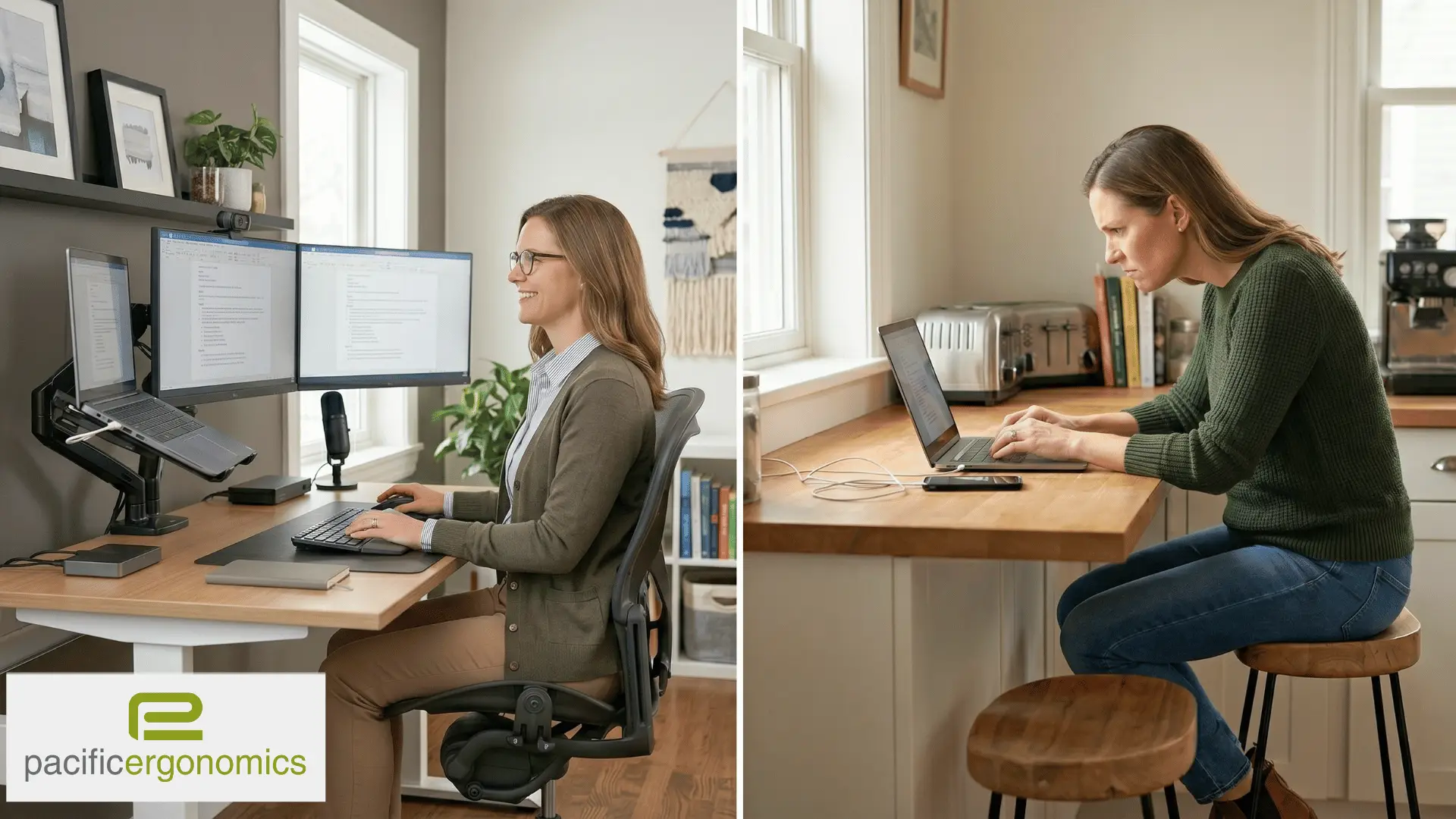
Imagine walking into your headquarters on a Monday morning. In the first cubicle, an engineer is sitting on the floor with a laptop balanced on her knees. Across the aisle, an analyst is working from a bed someone has dragged in. A finance director is perched on a backless bar stool, eight hours a day, no monitor, no monitor arm, his neck angled down at a laptop screen. Two product managers are sharing a single desk on alternating shifts. The one not currently at the desk is working from a bean bag in the corner.
WHAT WE TOLERATE AT HOME BUT WOULD NEVER ACCEPT AT THE OFFICE
No EHS director would tolerate this layout in a corporate office. It is happening in home offices across America right now.
No EHS director, no HR leader, no CEO, no facilities team in the country would tolerate this for a single day. The company would intervene before lunch.
This is precisely what is happening in home offices across the United States right now. Most companies have accepted it as normal because they cannot see it. The home office is not exempt from the principles of ergonomics. It is exempt only from the visibility that would force the company to act on them.
The Two Opposite Mistakes Companies Make
A surprising number of companies tell us, candidly, that they do not pay for home office equipment. Their position is that the home office is the employee’s responsibility. This is a mistake, and it is a mistake that costs more than the program would have. Employees do not stop buying equipment because the company has stopped paying. They buy it themselves.
In our experience, the largest single factor driving employee equipment purchases is aesthetics. Employees buy chairs because they look right in their apartment, condo or house. They buy desks because they match the rest of the furniture. They buy what is pretty, not what fits their body, supports their job function, or accommodates the hours they work. They don’t know how to do the later.
The company has not avoided the cost of the equipment. It has only avoided the visibility into what was purchased and the ability to influence whether it was the right choice.
The mistakes show up at both ends of the spectrum.
1. Some companies ship the same equipment to home offices that they ship to corporate workstations: the same desk dimensions, the same chair specifications, the same accessory bundle. The equipment that fits a 6-by-6 cubicle does not fit a 36-inch wall in a studio apartment.
2. Other companies do the opposite. The corporate office is fully equipped. Every workstation has a monitor arm, a keyboard tray, a properly specified chair, dual or triple monitors. The moment the conversation turns to home offices, those same accessories disappear from the budget.
Monitor arms are standard at headquarters and unavailable for the employee working from home four days a week This makes no sense. Multiple monitors are the norm at corporate and reduced to a single laptop screen at home, where the employee works with awkward postures that are high risk to their neck, shoulders and back.
What We Find When We Begin Virtual Ergonomic Assessments
If executives could see what we see when we begin
, they would require every home-based employee to have an ergonomic evaluation at hire and annually thereafter. The setups we encounter are not theoretical.
- We have assessed an employee working from her patio table.
- We have assessed employees perched on bar stools at kitchen counters.
- We have assessed setups that are not merely suboptimal but actively high-risk, postures that produce injury within months.
The home situation is not a sensitive topic to be tiptoed around. It is the ergonomic reality. Two adults sharing a single desk in a one-bedroom apartment will not be as productive, or as healthy, as two adults with their own properly equipped workstations. A parent working at the kitchen table while supervising a toddler is in a different ergonomic situation than a parent with a dedicated office.
Consider one practical example. We assess an employee with a 40-inch workspace- that is all they can fit. The company ships a 60-inch desk. That desk arrives in a box and never gets unpacked.
The employee continues working at whatever surface they were using before. The company has paid for the equipment, paid for the shipping, recorded the transaction as a completed delivery, and changed nothing about the underlying ergonomic exposure.
The Silence Problem
There is a second reason the injury risk in home offices is systematically underestimated. Employees who work from home, and who want to keep working from home, stay quiet about discomfort.
We see this consistently. An employee has been working at a kitchen table for two years. Their wrists hurt. Their lower back hurts. They have not told anyone. The moment they raise an ergonomic concern, they worry they will be told to come back to the corporate office. The home office is a benefit they value highly. They will absorb pain to protect it.
We see this most clearly in the first wave of assessments after a company announces a formal home office ergonomic program. Employees who have been silent for years suddenly disclose discomfort because, for the first time, the disclosure is paired with a solution rather than a threat. The number of employees with active musculoskeletal symptoms reported in those first assessment rounds is consistently higher than the company’s discomfort surveys had ever indicated.
3. Build Visibility Into Every Stage of the Ergonomic Assessment Process
A program is a multi-stage process. Most programs lose track of their own data at the handoff between stages.
A home office ergonomic program is not a one-time event. It is a multi-stage process. Assessment, recommendation, procurement, delivery, installation, training, follow-up. Every stage produces information that the company needs to see. Most programs lose track of that information at the handoff between stages.
The questions a defensible program must be able to answer at any time include: which employees have been assessed and which have not, what the assessor recommended, what equipment was actually ordered, whether the equipment was delivered, whether it was installed correctly, whether the employee was trained on its use, and whether the employee’s discomfort resolved as a result.
A program that cannot answer those questions on demand is not running on infrastructure. It is running on email threads, spreadsheets, and the institutional memory of a single coordinator. When that coordinator leaves, when the audit arrives, or when the workers’ compensation claim is filed, the program cannot defend itself.
The principle is straightforward. Every employee, every assessment, every recommendation, every piece of equipment, and every installation should be traceable through a single system that EHS, HR, and procurement all share visibility into. This is the kind of operational backbone that distinguishes serious ergonomic services from ad-hoc support. The technology used to provide that visibility matters less than the requirement that it exists.
A real program also gives leadership visibility into stage-level metrics: which assessments are pending, which equipment is in transit, which installations are complete, which employees have outstanding discomfort reports. Without that view, the program is a series of disconnected events. With it, the program becomes a managed system that leadership can actually direct.
4. Build Professional Installation Into the Home Office Ergonomic Program
The most expensive failure mode in home office programs is the equipment that arrives and never gets used.
We have repeatedly assessed home offices where the equipment the company purchased remains in its original packaging, weeks or months after delivery. Sometimes the box is too heavy for one person to move. Sometimes the assembly is more complex than the employee can manage between meetings. Sometimes the equipment, once partially assembled, reveals dimensions the employee did not anticipate and cannot accommodate. Sometimes the employee simply does not get to it.
Even when employees do unbox and assemble their own equipment, two new risks appear. The first is incorrect assembly: a height-adjustable base that is not properly anchored, a chair that is not correctly calibrated, a monitor arm that is not safely mounted. The second is physical injury during the installation itself.
The very act of installing the ergonomic equipment becomes a Workers’ Compensation exposure.
A real home office program treats commercial furniture installation as a service, not as the employee’s homework. The installer arrives, assembles the equipment, calibrates it to the employee’s measurements, validates the setup against the assessment recommendations, removes the packaging, and trains the employee on adjustment. The employee never lifts a box, never references an assembly diagram, and never wonders whether the equipment is set up correctly.
THE PRINCIPLE
The cost of professional installation is recovered the first time it prevents an unboxing injury or an unused desk. Programs that treat installation as optional are not saving money. They are deferring the cost into a different and larger category.
5. Build the Program Around Real Ergonomic Assessments, Not Self-Assessment Surveys
A self-assessment is not an ergonomic assessment. It is a paperwork exercise.
A growing number of companies have adopted self-assessment tools as their ergonomic program. The employee receives a diagram of correct posture and a checklist. They check the boxes that match their setup. The form is filed. The program is documented.
This is not an ergonomic assessment. It is a paperwork exercise.
A self-assessment tool assumes that the employee can accurately identify their own ergonomic risk, knows what correct posture looks like in their specific body, can evaluate the dimensions and adjustability of their own equipment, and will report honestly even when the report has consequences. None of these assumptions hold up in practice.
If self-assessments worked, workers’ compensation claims related to musculoskeletal disorders would not still represent a substantial share of all workplace injury claims. Knowing the principles of ergonomics does not mean an employee can apply them to their own situation. Knowing where the risk is does not mean knowing what the solution is. The connection between symptom and remedy is precisely the diagnostic work a certified ergonomist is trained to do.
There is also a behavioral problem self-assessments cannot overcome. Employees who fear that disclosing discomfort will result in being moved out of their home office often will not disclose it. Employees who do not want to admit they are working from a bar stool because they have no desk often will not say so. The form gets completed. The discomfort continues. The risk compounds.
A real ergonomic assessment requires a trained assessor evaluating the actual workstation, the actual employee, and the actual job function. Not the employee evaluating themselves against a diagram. This is true whether the work is done virtually for remote employees or working at the corporate office.
6. Design Equipment Request Channels That Deliver the Right Solution
When a program has only one path to equipment, employees use the path that exists, regardless of whether it matches their actual need.
In programs that lack a structured assessment process, employees learn how to navigate the system to get what they want. The most common pattern: an employee who wants a sit-stand desk learns that the only way to obtain one is to report discomfort. So they report discomfort.
The company pays what we call the discomfort price. The assessment is performed, the recommendation is made, the equipment is procured, and the program records another resolved case. But the employee may not have needed sit-stand functionality to address their actual ergonomic risk. They wanted it for reasons unrelated to discomfort, and the only available channel was the discomfort channel.
Meanwhile, the same employee may genuinely need a footrest, a different keyboard tray, or a chair adjustment that never gets identified because the assessment was triggered around the wrong issue.
A streamlined program addresses this in two ways. It creates separate channels for proactive ergonomic improvement and for discomfort-driven intervention, with appropriate criteria for each. And it ensures that any assessment triggered for any reason evaluates the full workstation, not just the symptom that prompted the request.
THE PRINCIPLE
The goal is to deliver the right equipment for the right reason, at minimum cost. Not to ration equipment by making employees prove discomfort to access it.
7. Build a Defined Process: The Process Is the Program
The presence or absence of a process IS the program. There is no third option.
Companies sometimes ask whether they need a formal home office ergonomic program, or whether they can handle requests as they come in. The question itself is the answer.
A company with no defined process will still receive ergonomic requests. Employees will still report discomfort. New hires will still need workstations. Existing employees will still move, change jobs, or change health conditions. Equipment will still need to be ordered, delivered, installed, and replaced. The work happens regardless of whether the company has chosen to organize it.
The choice is whether that work happens through a process the company designed or through whatever ad-hoc routes employees and managers improvise. The first option produces consistent outcomes, controlled costs, and defensible documentation. The second produces inconsistent outcomes, uncontrolled costs, and a paper trail that will not hold up to scrutiny.
The simplest test of whether a company has a real program is whether it can answer these ten questions in writing:
- How do new hires get their home office assessed and equipped?
- How are equipment requests evaluated and approved?
- What happens when an employee reports discomfort?
- Who follows up after equipment is installed to confirm it is being used correctly?
- What ongoing training or reassessment is provided?
- How is the program adjusted when an employee moves or changes roles?
- How are Workers Comp cases handled at each state.
- How are home office, hybrid and corporate supported with assessments and products?
- What visibility is there to see what every employee has been offered, accepted.
- What stage of the process is an employee who is having an assessment….request, scheduled, installed etc.
A company that cannot answer all ten of these questions does not have a home office ergonomic program. It has a series of requests it responds to.
8. Design the Program to Adapt as Employees Change
A program designed around the assumption that conditions hold still will be wrong about most employees within 18 months.
A home office ergonomic assessment is not permanent. The employee’s body changes. Their job changes. Their equipment ages. In regions like Southern California, where housing costs drive frequent relocation, employees move from one apartment to another every two or three years on average. This is one of the reasons ergonomic assessments in San Diego face a different cadence pressure than other markets.
The home office that was assessed and equipped at the previous address may bear no resemblance to the one the employee is working from today. The desk that fit the previous space does not fit the new one. The lighting is different. The room dimensions are different. The assessment that was correct in January is no longer correct in November.
A program that conducts an assessment at hire and never revisits it is a program that becomes inaccurate over time. None of this is a failure of the original assessment. It is a failure to design the program with the assumption that change is the default.
A defensible program includes scheduled reassessment intervals, a defined process for assessment when employees move or change roles, and follow-up after every equipment change to verify the new setup actually works. Annual reassessment is a defensible standard for most populations. Higher-risk roles or employees with active discomfort warrant more frequent attention.
9. Specify Equipment by Fit, Not by Category Name
The list of items provided is not the program. The qualification of those items to the specific employee is the program.
Companies often describe their home office program by what they provide: a chair, a desk, a monitor arm. The list of items is treated as evidence that the program is doing its job.
Consider what “we provide a chair” actually means. Does it mean a dining room chair, taken from the kitchen because it was already there A recliner that the employee found comfortable in the living room A task chair purchased online because it photographed well Even within the category of task chairs sold as ergonomic, the variance in fit, adjustability, and intended use is enormous. A chair appropriate for a 5’2″ employee doing two-hour focused work is not the same chair appropriate for a 6’4″ employee in back-to-back video calls for nine hours a day.
A chair specified without reference to the body it will support is not an ergonomic decision. It is a furniture purchase.
The same principle holds for every other equipment category. A sit-stand desk in the wrong application can increase ergonomic risk rather than reduce it. The wrong height range forces the employee into postures worse than the static desk they replaced. A desk-top riser placed on a desk that was already too tall puts the keyboard above shoulder height in standing mode, generating injury at the very moment the employee is told they are doing something good for their health.
Equipment standards without qualification produce worse outcomes than admitting the program does not have standards.
The Role of a Curated Ergonomic Catalog
This is why a curated ergonomic catalog is essential to any serious home office program. Not a general furniture catalog. Not an Amazon link. A curated catalog is a deliberately constructed selection of equipment, vetted by certified ergonomists, organized so that every item in it has a clear application and a clear set of conditions under which it is the right choice.
A curated catalog accomplishes three things at once. It standardizes quality, ensuring no employee ends up with equipment that does not meet ergonomic criteria. It controls cost, because the curation process selects equipment with predictable pricing, defensible warranties, and consistent supply. It accelerates delivery, because a curated catalog is integrated with procurement and installation rather than improvised after each request.
THE PRINCIPLE
The curated catalog is what allows a program to be both standardized and individually appropriate at the same time.
10. Deliver Personalized Ergonomic Training, Not Generic Training
Generic training is consumed the same way employees consume HR policy documents. They click through it. They acknowledge it. They forget it.
Most corporate ergonomic training looks the same regardless of the employee receiving it. A 20-minute video. A slide deck. A PDF attached to the onboarding packet. The content covers general principles that apply to every employee in roughly the same way.
This kind of training is consumed the same way employees consume HR policy documents or annual compliance modules. The training has been delivered. The behavior has not changed.
The reason generic training fails is that ergonomics is not a general subject. It is a specific subject that varies by employee, by workstation, by job function, and by the equipment that employee uses. A petite employee working on a laptop at a kitchen counter needs different training than a tall employee with a properly equipped home office.
Personalized training answers the question the employee actually has: not “what is good ergonomics in general,” but “what should I do differently in my specific situation, with my specific equipment, for the work I actually do.”
When training is delivered just in time, in response to the employee’s actual workstation and assessment findings, it stops being a checkbox and starts being useful. The employee does not have to translate general principles into their specific case. The translation has already been done.
The principle holds regardless of how the training is delivered. A 10-minute personalized video is more effective than a two-hour generic webinar. A short written guide tailored to an employee’s specific equipment is more effective than a comprehensive ergonomic handbook. The dimension that drives outcomes is relevance, not duration or production value.
Most companies have not deployed personalized training because the methods of doing so cost-effectively at scale have, until recently, not existed. That is changing. Programs designed to deliver personalized training to remote and hybrid populations, without doubling the program’s cost, are now operationally viable for organizations of any size.
11. Equip EHS Teams and Trained Managers With the Right Lens
When the workforce is at home, the informal signals EHS and managers normally rely on disappear. Programs need a different observation framework.
In a mature corporate ergonomic program, the EHS team carries primary responsibility for identifying and acting on ergonomic risk. Managers contribute secondary visibility. The strongest programs train selected managers in high-level risk identification so they can route concerns to EHS efficiently.
When the workforce is in the corporate office, both groups have informal access to ergonomic information they may not realize they are gathering. EHS walks the floor. Managers see whether someone is leaning awkwardly, the employee who keeps standing up to stretch, the colleague who suddenly switched to using a laptop on a stack of books.
When the workforce is at home, that signal disappears. The video frame shows a head and shoulders. The chat platform shows messages. The discomfort that builds quietly over months in a remote employee’s wrist or lower back is invisible to both EHS and the manager until it becomes a complaint, a missed deadline, or a workers’ compensation claim.
Effective home office programs enable a lens into the home office to see how employees are working with the pictures. They equip both groups with a different observation framework. The signs of ergonomic risk in a remote employee are visually obvious when combined with the report indications.
12. Build Reassessment Into the Operating Cadence
A program designed around the assumption of change will be right about most employees most of the time.
A home office ergonomic assessment captures one moment in one employee’s life. The employee’s body, equipment, workstation, job function, and physical environment at the time of the assessment determine the recommendations. Every one of those variables changes over time, and most of them change faster than companies plan for.
The California experience makes this concrete. Ergonomic consulting services in San Diego in particular have to be designed around the assumption that an employee assessed in their apartment in San Diego in January may be working from a different apartment in Orange County by November. The desk that fit the previous space does not fit the new one. The lighting is different. The room dimensions are different.
The same dynamic applies, on different timelines, to every other change the employee will experience. A new role with different computer demands. A new manager with different meeting rhythms. A change in physical health that alters what the body can tolerate. Pregnancy, recovery from injury, age-related changes in vision or mobility. Each of these can invalidate the assumptions the original assessment was built on.
A defensible program builds reassessment into its operating cadence rather than treating it as an exception. Annual reassessment is a defensible standard for most populations and most roles. Triggered reassessment, initiated by a move, a role change, a discomfort report, or a request from the employee, handles the cases that fall between annual cycles.
13. Design the Program to Support Hybrid Employees Specifically
Hybrid is the highest-risk population precisely because most companies have not figured out how to support it operationally.
The hardest population to design a program for is the hybrid workforce, and most companies fail at it. An employee who works three days at home and two days in the corporate office has two workstations contributing to their cumulative ergonomic exposure. Almost every company we encounter assesses only one of them, the corporate one, because that is the workstation the company can see and control.
We see the consequence of this approach in nearly every hybrid engagement. The corporate workstation is fine. We arrive on a Tuesday, conduct the assessment the company is paying for, recommend minor adjustments, and leave. The employee’s home setup is the source of their discomfort.
The pain they bring into the office on Tuesday morning was generated at the kitchen table on Thursday, Friday and the weekend work.
Hybrid is the highest-risk population precisely because companies have not figured out how to support it operationally. They know what to do for fully in-office employees, and they have begun to figure out what to do for fully remote employees. The hybrid employee falls between the two systems.
THE PRINCIPLE
Discomfort in the body travels with the employee. If the home setup is wrong, the corporate setup cannot fix the flare ups the body is producing. A real hybrid program assesses both workstations.
14. Use the Program as a Recruiting and Retention Asset
The recruiting and retention value of an ergonomic program shows up in conversations the company never gets to hear.
Talent attraction and retention are difficult to measure in real time. By the time a company sees the data, the decision was already made. The reasons behind those decisions usually do not surface in formal channels.
Ergonomists hear them anyway. The setting matters. An ergonomic assessment is a one-on-one conversation in the employee’s actual workspace, conducted by someone who is not their manager, not in HR, and not in a position to affect their performance review. Employees talk during these assessments. They talk about their previous job. They talk about how they feel about their current employer. They talk about whether they are thinking about leaving.
What employees tell us during assessments at companies with strong programs:
“I am so grateful for my company. They really care about their employees. They provide ergonomic assessments and products. I did not have this at my last company and I value it enormously.”
What employees tell us during assessments at companies that have just started a program after years of providing nothing:
“My last company really did not care how we worked. I told my manager I was uncomfortable at home and they would not support it. They said it was my responsibility. It did not make me feel good about the company. When I came to this new company and they offered this, it was a big indicator of the culture I was joining.”
And what employees tell us when we begin work at a company whose previous program was broken:
“Is anything actually going to happen with this report I know people who had an assessment before and nothing changed for them. Is this going to make any difference, I really don’t think the company cares how we feel.”
This third pattern is the most revealing. It is not a complaint about ergonomics. It is a complaint about the company’s reliability. The employee learned that raising a concern produces paperwork, not action. The next time discomfort develops, the employee does not raise it.
Almost no candidate who declines a job offer cites the lack of home office equipment support as the reason. That does not mean the company is not losing them for that reason. It means the candidate is not telling the company. The same dynamic applies to retention. Patterns like these show up consistently across our ergonomic case studies.
A home office ergonomic program is one of the few cultural signals that is concrete, observable, and difficult to fake.
15. Control Cost by Specifying the Right Equipment the First Time
Companies that have not built a real program assume one would cost more. The opposite is true. They are already spending the money.
Companies that have not built a real home office ergonomic program often assume that a real program would cost more than what they are doing now. The opposite is true in most cases. The company is already spending the money. It is just spending it inefficiently, in categories the finance team has not connected to ergonomics.
A program that specifies the right equipment the first time does not pay to specify it twice.
When employees select their own equipment, the company pays for the original purchase. Some percentage of that equipment is wrong for the employee, the workstation, or the job function. The company then pays again to replace it once the discomfort develops, the workstation proves unworkable, or the equipment fails to fit the space. Between the first purchase and the second, the employee spends weeks or months working in suboptimal conditions. In the worst cases, the discomfort becomes a workers’ compensation claim that the company is now also paying for.
The total cost of the wrong-equipment cycle is rarely calculated as a single number. It is split across the original equipment budget, the replacement equipment budget, the productivity loss, the discomfort response, and any claims that result. None of these line items, considered separately, looks like an ergonomic problem. Considered together, they reveal that the company has paid two and three times for a single workstation, while the employee has been suffering throughout.
A program that gets the specification right the first time eliminates this multiplication. The equipment is selected to fit the employee. The installation is done correctly. The training is delivered. The follow-up confirms that the discomfort has resolved. The cost is bounded and predictable, and the value of avoided rework alone covers most or all of the program’s cost.
Until recently, the constraint that prevented many companies from running a real program was not the value of the program. It was the operational cost of delivering personalized assessments, curated equipment, and trained installation at scale. That constraint is changing. New approaches are making it possible to deliver personalized ergonomic support at the scale of an entire workforce, at a cost that compares favorably to the stipend programs companies have been running.
Treat the Program as Operating Discipline, Not Equipment Spend
The equipment is not the program. The program is the operating discipline that determines whether the equipment delivers any value at all.
The temptation, after reading an article about corporate home office ergonomics, is to think the answer is to buy better equipment. It is not. Better equipment, specified for the wrong employee, installed without supervision, and unsupported by training or follow-up, produces no better outcome than the equipment companies are already buying.
The four arguments at the beginning of this article establish why the program is worth the investment. Productivity, insurance, claims, and talent. Each argument is independently sufficient. Together they make declining the program difficult to defend. The fifteen elements between that opening and this close are not a checklist. They are the components of an operating system that turns ergonomic spend into measurable risk reduction, productivity gains, and cultural signal.
The hardest part of building this operating system is not the ergonomic expertise. It is the systems and processes that surround the expertise. Most companies that have struggled with home office programs have struggled here, not in the assessment itself. Companies looking for this combined operational and ergonomic capability often turn to specialized providers like Pacific Ergonomics for help building the program from the ground up.
THE BOTTOM LINE
The companies that get this right treat the program as infrastructure. They build it once, they run it consistently, and they measure the outcomes that matter. The difference between the two approaches is not the budget. It is the discipline.
How to Start in the Next 30 Days
If you are an EHS, HR, or executive leader who wants to move away from a stipend to a real home office ergonomic program, the following five actions can be initiated within 30 days and will surface most of the operational gaps your current approach is hiding.
- Inventory your home office population. Pull a clean count of fully remote, hybrid, and in-office employees, segmented by role and tenure. Most companies cannot produce this list in under a week, which itself is a finding.
- Audit your last 12 months of ergonomic spend. Include stipends, equipment purchases, replacement equipment, and any workers’ compensation claims with an MSD diagnosis. Total it as a single number.
- Pilot virtual ergonomic assessments on a small high-risk group. Twenty to fifty employees with active discomfort reports, recent moves, or hybrid schedules. Use certified ergonomists, not self-assessment surveys with a turnkey ergonomic program that has a portal and process built in.
- Map the current process in writing. What happens today when an employee reports discomfort Who responds, in what timeframe, with what authority If the map is short, the program is short.
- Identify the operational owner. Decide which leader or function owns the program end-to-end. Without a single point of accountability, none of the above will compound into a program.
These five actions produce the diagnostic foundation that every successful corporate home office ergonomic program is built on.
Build a Home Office Ergonomic Program That Works
Pacific Ergonomics designs and operates corporate home office ergonomic programs for companies of all types including healthcare systems, biotech, insurance companies, mid-sized companies, defense contractors, government agencies, and Fortune 500 employers. Virtual and on-site assessments, curated catalogs, certified ergonomists, equipment procurement and installation across the U.S., and the operational infrastructure to deliver outcomes at scale.
Call 619-546-0872 or request a consultation at pacificergo.com
Learn More
Frequently Asked Questions About Corporate Home Office Ergonomic Programs
About Pacific Ergonomics
Pacific Ergonomics is a corporate ergonomic consulting and commercial furniture firm headquartered in Escondido, California, serving organizations across San Diego, Orange County, Los Angeles, San Francisco and the United States. Founded over 20 years ago, the firm operates two integrated divisions: turnkey ergonomic consulting programs, and turnkey commercial furniture procurement combining function, form and aesthetics. Together they deliver turnkey workplace solutions for offices, laboratories, manufacturing environments, and corporate sponsored home offices. Pacific Ergonomics serves a wide range of markets including healthcare, biotech, defense, government, and higher education. The firm is a Certified Woman-Owned Small Business and supports federal, California state, and local government clients through Omnia Partners, and TIPS contract vehicles.